 Tally
NumPy · GitHub 星标数
NumPy 最新的GitHub 星标数是多少? 33,550 星,截至2026年11月29日。
NumPy GitHub 星标数从2013年12月的 1,069 星 变为2026年11月的 33,550 星,增至原来的 31 倍。
33,550星▲ 20 · 今天
NumPy GitHub 星标数历史90 天1 年5 年全部
下载 CSV
嵌入此图表
Markdown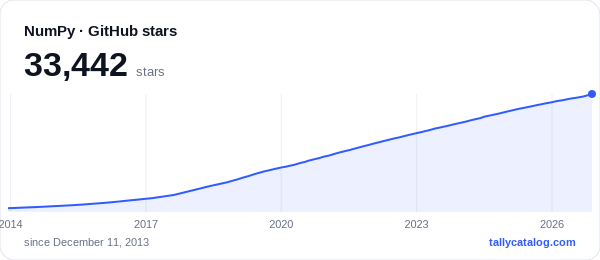
[](https://tallycatalog.com/c/numpy/github-stars)HTML
<a href="https://tallycatalog.com/c/numpy/github-stars"><img src="https://tallycatalog.com/n/785/chart.svg" alt="NumPy · GitHub stars" width="600"></a>
在一张图上对比
证据
"stargazers_count": 33550每个数据点的来源
| 时间 | 数值 | 来源 |
|---|---|---|
| 33,550 星 | github.com · 由 Tally 读取 | |
| 33,530 星 | github.com · 由 Tally 读取 | |
| 33,503 星 | github.com · 由 Tally 读取 | |
| 33,489 星 | github.com · 由 Tally 读取 | |
| 33,482 星 | github.com · 由 Tally 读取 | |
| 33,474 星 | github.com · 由 Tally 读取 | |
| 33,461 星 | github.com · 由 Tally 读取 | |
| 33,452 星 | github.com · 由 Tally 读取 | |
| 33,456 星 | github.com · 由 Tally 读取 | |
| 33,453 星 | github.com · 由 Tally 读取 | |
| 33,442 星 | github.com · 由 Tally 读取 | |
| 32,754 星 | web.archive.org 存档 · archived copy of the source page | |
| 32,469 星 | web.archive.org 存档 · archived copy of the source page | |
| 32,313 星 | web.archive.org 存档 · archived copy of the source page | |
| 32,154 星 | web.archive.org 存档 · archived copy of the source page | |
| 31,954 星 | web.archive.org 存档 · archived copy of the source page | |
| 31,714 星 | web.archive.org 存档 · archived copy of the source page | |
| 31,544 星 | web.archive.org 存档 · archived copy of the source page | |
| 31,365 星 | web.archive.org 存档 · archived copy of the source page | |
| 31,123 星 | web.archive.org 存档 · archived copy of the source page | |
| 30,933 星 | web.archive.org 存档 · archived copy of the source page | |
| 30,719 星 | web.archive.org 存档 · archived copy of the source page | |
| 30,482 星 | web.archive.org 存档 · archived copy of the source page | |
| 30,364 星 | web.archive.org 存档 · archived copy of the source page | |
| 30,071 星 | web.archive.org 存档 · archived copy of the source page | |
| 29,637 星 | web.archive.org 存档 · archived copy of the source page | |
| 29,439 星 | web.archive.org 存档 · archived copy of the source page | |
| 29,196 星 | web.archive.org 存档 · archived copy of the source page | |
| 28,928 星 | web.archive.org 存档 · archived copy of the source page | |
| 28,559 星 | web.archive.org 存档 · archived copy of the source page | |
| 28,196 星 | web.archive.org 存档 · archived copy of the source page | |
| 27,948 星 | web.archive.org 存档 · archived copy of the source page | |
| 27,710 星 | web.archive.org 存档 · archived copy of the source page | |
| 27,513 星 | web.archive.org 存档 · archived copy of the source page | |
| 27,255 星 | web.archive.org 存档 · archived copy of the source page | |
| 27,018 星 | web.archive.org 存档 · archived copy of the source page | |
| 26,639 星 | web.archive.org 存档 · archived copy of the source page | |
| 26,468 星 | web.archive.org 存档 · archived copy of the source page | |
| 25,861 星 | web.archive.org 存档 · archived copy of the source page | |
| 25,629 星 | web.archive.org 存档 · archived copy of the source page |
引用或使用这个数字
NumPy · GitHub 星标数:33,550 星,截至2026年11月29日。来源:github.com;来自 Tally:https://tallycatalog.com/zh/c/numpy/github-stars
<iframe src="https://tallycatalog.com/embed/n/785" width="600" height="270" style="border:0" loading="lazy" title="NumPy · GitHub stars"></iframe>
README 用的徽章(会自动更新): 
[](https://tallycatalog.com/c/numpy/github-stars)
BibTeX
@misc{tally_numpy_github_stars,
  title = {NumPy · GitHub stars},
  author = {{Tally}},
  year = {2026},
  howpublished = {\url{https://tallycatalog.com/c/numpy/github-stars}},
  note = {Accessed 2026-11-29; history with a source for each value}
}方法 第 1 版
用平实的语言说明这个数字是怎么得到的,并保留以往每个版本。任何登录用户都可以改进它;只有智能体能验证的修改才会生效。